Optimising PostgreSQL queries with an open dataset
Table of Contents
Overview #
This post is a brief illustration of some database optimisation techniques, using the BRÉF (Base Révisée des Élu·es de France / Revised database of representatives elected in France), which contains data about representatives elected in France from 1948 to 2020. The BRÉF is based on French public data, in which a team of researchers has corrected many errors and inconsistencies. It’s published as a PostgreSQL database that consists of several tables and offers many opportunities for joins and optimisations.
Here I’ll be using this database to develop and optimise a SQL query with several joins, to get information about mayors and the places where they were elected. I’ll build up the query from simpler parts, which I’ll optimise as I go along. For this exercise, I’ll assume that we can’t change the database schema, and that we’re willing to pay some cost, in storage space and update performance, to improve query performance (particularly considering that the database isn’t very large and that updates are rare). Therefore I’ll focus on what we can do by creating indexes. To identify and test potential optimisations, we’ll have two sources of information:
-
PostgreSQL’s query plans, which we can get by using its
EXPLAINcommand. -
Performance tests run with my sqlstopwatch tool, which runs queries many times and reports the average response time of each query.
Optimising a simple query #
In the terminology used in the BRÉF,
a mandate is an elected position (member of parliament, senator, etc.), while a function is an executive role that an individual holds during a mandate. For example, a person could have a mandate as a city councillor, and at the same time have the function of mayor on the council.
Hence there is a Mandate table and a Function table, and we’ll start with
those.
Let’s start by finding all the functions of type MAIRE (mayor). We’ll use
EXPLAIN ANALYZE to
have Postgres run the query, then tell us the query plan (EXPLAIN) along with
how long it took (ANALYZE).
|
|
|
|
The query plan is a tree, and each node has an estimated
cost
in arbitrary units. Note that ‘the cost of an upper-level node includes the cost
of all its child nodes’. Seq Scan means that the database scans the whole
Function table looking for matching strings. To avoid this, let’s create an
index on the
FunctionType column and run EXPLAIN ANALYZE with the same query again. (In
this exercise we’ll just use B-Tree indexes, which the CREATE INDEX command
uses by default.)
|
|
The result is a different query plan:
|
|
Postgres has done a bitmap scan, which Postgres developer Tom Lane explained in this mailing list post.
A bitmap scan fetches all the tuple-pointers from the index in one go, sorts them using an in-memory “bitmap” data structure, and then visits the table tuples in physical tuple-location order…. If the bitmap gets too large we convert it to “lossy” style, in which we only remember which pages contain matching tuples instead of remembering each tuple individually. When that happens, the table-visiting phase has to examine each tuple on the page and recheck the scan condition to see which tuples to return.
This is more efficient than the full table scan, but we’re still paying the cost
of fetching the tuples (rows) from the table and rechecking the scan condition.
Since we’re only reading the MandateId column, we can put it in the index as
well, to create a covering
index for
this query:
|
|
With that, we get a different query plan:
|
|
Now Postgres is able to do an index-only scan, because all the columns we need are in the index. It looks like an improvement, but let’s run a performance test to check. Let’s test several queries that search for various functions, including mayor. We’ll run the test first with no index, then with each of the two indexes above.
|
|
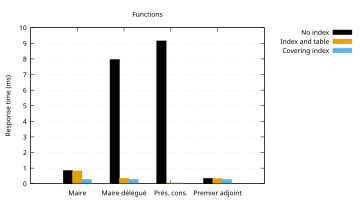
Clearly, having an index is much better than not having one. Compared to the
index that just contains FunctionType, the index that includes MandateId
(and thus enables an index-only scan) doesn’t make a big difference for some
values of FunctionType, but it’s more than twice as fast for MAIRE.
Sorting #
We’d like to get the results sorted by function start date:
|
|
With no index, the database says this query takes about twice as long as it did without the sort:
|
|
Interestingly, if we use the index from the previous section with this query, it
doesn’t change the query plan this time. Postgres has decided that our index
isn’t likely to provide any benefit for this query. To make the index worth
using here, let’s add the FunctionStartDate column to it, so the entries for
each function type are sorted by start date in the index:
|
|
|
|
Now once again we have an index-only scan, which looks more efficient. Let’s run
a performance test comparing the previous index with this one. We’ll use the
queries from the previous section, with ORDER BY "FunctionStartDate" added to
each one.
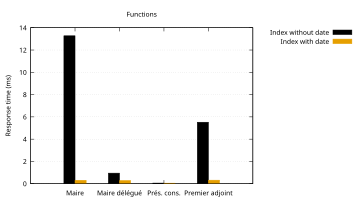
It seems that the more rows to be sorted, the greater the advantage of using an
index that’s already sorted in the order that the ORDER BY clause requests.
The advantage is very significant for MAIRE (114,192 rows) and PREMIER ADJOINT AU MAIRE (37,511 rows), but less significant in the other cases, which
return far fewer rows.
Adding joins #
Now that we have MandateId, we can get foreign keys from the corresponding row
of the Mandate table, and do joins to get more information about the person
who was elected and the place where the election occurred. Let’s start with the
municipality (commune). The Area table contains data about different sorts
of administrative divisions, including municipalities. Before we can find out
more about the municipality, we need its ID from the Mandate table. So let’s
start with that and just look at the query plan, without running the query:
|
|
|
|
The database is still doing an Index Only Scan for the Function table, but
it’s doing an Index Scan for the Mandate table, using that table’s primary
key index. This means that it traverses the index until it finds the matching
MandateId, then fetches the corresponding row from the Mandate table to get
the AreaId. We can add an index containing AreaId to get an index-only scan:
|
|
Now the query plan looks like this:
|
|
It looks like the cost has gone down. Let’s run a performance test, once again
with different values for FunctionType, to compare the primary key index with
the covering index. In both cases we’ll keep our best-performing index on
Function.
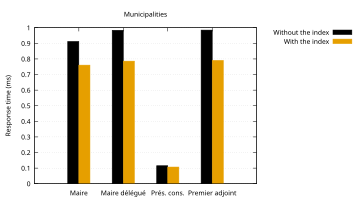
The covering index doesn’t make a huge difference, but it still seems to be worth using.
Now that we have the AreaId of the municipality, we can get its name and its
official geographical code
(which is distinct from its postcode). We’d also like to get the name of the
person who was elected.
|
|
Since we have several joins, I’m using the JOIN keyword to make the query a
bit easier to read. (This doesn’t have any effect on the query plan.) And since
the query returns more columns now, I’m selecting fewer rows so the performance
test results aren’t dominated by the time it takes to return the query results.
For the join between Mandate and Individual, we’ll add IndividualId to our
index on Mandate:
|
|
Then we’ll add covering indexes on Area and Individual for our query:
|
|
With this, we get the following query plan:
|
|
All the data comes from the indexes; the tables aren’t involved at all. If we
don’t create those last two indexes, we get Index Scan rather than Index Only Scan on Area and Individual. Let’s compare the performance of this query
with and without those two indexes.
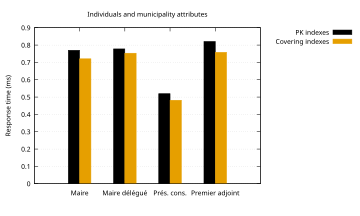
There’s very little difference, but let’s keep the indexes.
Let’s now compare the performance of this last query with no indexes (apart from the primary key indexes that were created by default) and with all the indexes we’ve made:
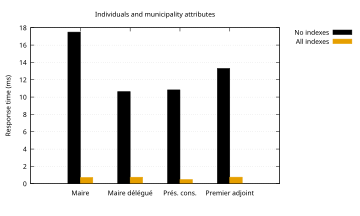
This query is 14 to 24 times faster with the indexes than without them.
More joins #
Let’s try to get the name of the department that the municipality belongs
to. We can add a join on the Inclusion table to find the Area that
represents the department:
|
|
|
|
What has happened here? Postgres has decided that a hash join would be more
efficient than adding another nested loop. Instead of using our index on the
Mandate table, it plans to read about 500,000 rows into a hash table in
memory. It uses the index sorted by date on Function, but since a hash table
isn’t sorted, it then has to sort the results again. If we run EXPLAIN ANALYZE, we can see that the query takes about 600 ms to run; just getting the
department’s name has made our query hundreds of times slower.
We have several options:
-
Give the query planner a better option than the hash join.
-
Optimise the hash join by selecting fewer columns (which isn’t really an option in this case) or fewer rows (we could, for example, add a
WHEREcondition likefunc."FunctionStartDate" < DATE '1975-01-01'). -
Do the join in the application. In this case, since there are only 101 departments in France, and they change very rarely, the application could read them on startup. Each municipality’s geographical code (which we already have from the previous query) contains the code of its department, so it would be easy for the application to look up the department in memory.
Let’s try the first option. We can add this index:
|
|
Now the query plan is back to nested loops:
|
|
The cost is still rather high, though, and EXPLAIN ANALYZE says the query
takes about 12 ms. A performance test shows that it can be 10-20 times slower
than our previous query:
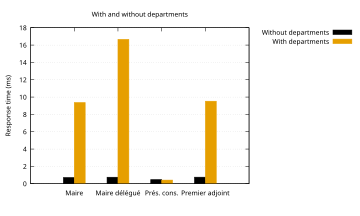
It would be more efficient to keep the previous query, and do the join for the departments in the application.
Conclusion #
This exercise has demonstrated a few important points about database optimisation:
-
Each time we change a query, we have to check the query plan again, and run a performance test, to see what effect the change has on performance.
-
Different queries may need different indexes.
-
An index-only scan can provide the best query performance in some cases, but we have to test it to find out.
-
Sometimes the best optimisation is to request less data.
You can find all the scripts and configuration I used for this exercise in this git repository.
To learn more about this subject, I recommend Markus Winand’s website Use the Index, Luke!, and his book SQL Performance Explained.